
Thank you for signing up with Bulk Buy Hosting. I’m glad to have you on board as a member and look forward to serving your needs.
Kevin Graham, Founder.
How Do I Get Started?
You can begin deploying domains by logging in to your Dashboard right away.
Put Your AI to Work
Every Bulk Buy Hosting plan includes our free JSON API, so an AI agent such as Claude, ChatGPT or Gemini, or your own scripts, can deploy domains, list your whole network, and pull each site’s server, IP, cPanel or DirectAdmin login and name servers. With those logins, your agent can also use the control panel’s own API for DNS, email, databases, files, SSL and installing WordPress.
- Get your API credentials. Log in to your Dashboard and click the button to get them.
- Point your AI at our agent guide. Using the Bulk Buy Hosting API with an AI Agent is written for AI agents to read. It covers the endpoints, worked examples and a starter prompt. Full documentation, with runnable Postman examples, is at api.bulkbuyhosting.com.
- Give it a first job. For example: “Deploy these twenty domains, install WordPress on each, set their name servers and report anything that failed.”
Keep your API credentials in your tool rather than pasting them into a chat, and have your agent confirm before it deploys, since each deploy uses a slot on your plan. You can regenerate your credentials at any time.
Add Your Team Members
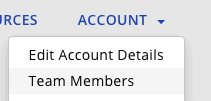
Bulk Buy Hosting includes support for unlimited team member accounts as part of your membership. To add your team, click the “Account” menu and select “Team Members”.
Enable Two Factor Authentication
Bulk Buy Hosting also includes Two Factor Authentication (2FA). To enable it, login and click the “Account” menu and choose “Security Settings”.
Where are the Name Servers, cPanel Logins, etc?
The name servers vary for each server, because we use the name servers provided to us by our hosting partners. This means that each server is unique, and you don’t have a name server footprint of all of the domains being hosted on a domain that we own.
The details for each domain will appear on your Dashboard after the domain has been set up.
Any Other Questions?
Please check the FAQ and the Guides sections of our site, where answers to most of the most commonly asked questions can be found. If you still have more questions, please submit a support ticket and we’ll get back to you.
